Dedicated barcode labeling software is what closes that gap. It's not a WMS. It's not a shipping rate platform. It's the specific layer that generates, formats, and prints the machine-readable labels tying physical goods to digital records — at every dock door, every shift.
This guide covers what barcode labeling software actually is, how it fits inbound and outbound workflows, which features matter, and how to implement it without digitizing a broken process.
TL;DR
- Barcode labeling software generates and prints machine-readable labels for inbound and outbound shipments, separate from WMS or shipping platforms
- GS1-128/SSCC labels are mandatory for pallet-level logistics; carrier compliance labels follow separate specs per carrier
- Look for drag-and-drop template design, multi-symbology support, thermal printer compatibility, and ERP/WMS integration
- Thermal transfer outperforms direct thermal where dock heat, moisture, and abrasion are factors
- Start with a process audit before any software deployment; digitizing a flawed workflow only speeds up the errors
What Is Shipping & Receiving Barcode Labeling Software?
Barcode labeling software generates, formats, and prints machine-readable labels applied to inbound shipments, outbound packages, pallets, and individual items. It's the foundational data layer connecting physical goods to the digital records in your systems — not a full warehouse management system, and not a carrier rate-shopping tool.
Gartner classifies this as "label and artwork management": a distinct category from WMS platforms and transportation software. Buyers who conflate the three often end up purchasing a WMS expecting labeling flexibility it wasn't designed to deliver.
How It Differs from WMS and Shipping Software
| Tool | Primary Function |
|---|---|
| Barcode Labeling Software | Design, generate, and print compliant labels |
| WMS | Manage inventory, putaway, picking, and order fulfillment |
| Shipping Software | Carrier rate shopping, tracking, and manifest management |
Labeling software can operate standalone or integrate with both WMS and shipping platforms. Many facilities run it embedded within a WMS; others run it independently with spreadsheet-based data imports. The right choice typically comes down to your existing ERP or WMS stack — and how much label customization your compliance requirements demand.
The Two Core Label Categories
Every shipping and receiving operation needs both:
- Inbound/receiving labels — ASN labels, SSCC pallet labels, put-away tags, location identifiers
- Outbound/shipping labels — carrier compliance labels, carton content labels, packing slips, routing codes
Industrial and manufacturing environments routinely need both, often across multiple dock doors and product lines.
How Barcodes Power the Shipping & Receiving Workflow
Inbound: From Dock to Storage
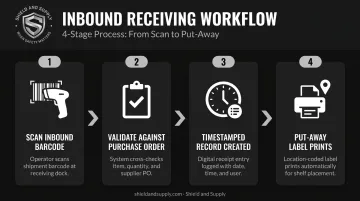
When a supplier shipment arrives, the receiving workflow looks like this:
- Scan inbound barcode — typically a GS1-128 or SSCC label on the pallet or carton
- Software validates contents against the purchase order, flagging discrepancies instantly
- Timestamped records replace manual counts and paper-based receiving logs
- Put-away labels print on the spot — assigning bin, shelf, or zone identifiers so items are traceable from the moment they enter the facility
The SSCC (Serial Shipping Container Code) is the single mandatory element for all GS1 Logistic Labels, typically encoded in a GS1-128 barcode. When that label is tied to an Advance Ship Notice (ASN or EDI 856), receiving teams can validate an entire pallet against expected contents in seconds rather than minutes.
Outbound: From Pick to Ship
The outbound labeling sequence follows the same logic:
- Order is picked and packed — staged for label generation at the pack station
- Labeling software generates the carrier-compliant shipping label — tracking barcode, routing code, delivery address, and any required compliance data
- Label prints and is applied at the pack station
- Package is scanned for final verification before carrier handoff
Each scan creates an auditable chain of custody. It also prevents the errors that cost money: wrong label on the wrong box, missing hazmat declarations, or carrier format non-compliance that triggers rejection fees. UPS, for example, has introduced a $5.00 per package Non-Compliant Label Fee for Ground Saver shipments that fail to meet label requirements.
Returns
Returned items arrive with existing barcodes or pre-printed return labels. Scanning them triggers inventory reinstatement and condition logging. Consistent labeling standards across inbound and outbound workflows make returns processing faster: there's no ambiguity about what the item is, where it came from, or where it should go.
Key Features to Look for in Barcode Labeling Software
Label Design and Template Flexibility
Operations teams need to create and modify labels without submitting IT tickets. A drag-and-drop template designer solves this. Look for:
- Variable data fields — SKU, lot number, serial number, expiration date, SSCC
- Reusable templates per label type (receiving, put-away, packing, shipping, returns)
- Multiple barcode symbologies in one platform — Code 128, GS1-128, QR Code, Data Matrix, ITF-14, PDF417
Industrial facilities routinely use several symbologies simultaneously. Inbound pallets may require GS1-128 SSCC labels while unit-level items use Data Matrix and internal routing uses Code 39. One platform needs to handle all of them.
LabelSuite™ from Shield and Supply supports 1D symbologies (Code 39, Code 128, UPC, EAN, GS1, ITF) and 2D formats (Data Matrix, QR Code), with ISO/IEC 18004-compliant QR code generation and variable-data serialization built in.
Printer Compatibility and Print Performance
Software is only as effective as its hardware integration. Key requirements:
- Thermal transfer printer support for durable dock-environment labels
- Compatible print languages — ZPL and EPL are widely supported Zebra printer languages that most warehouse-focused labeling software needs to accommodate
- DPI alignment between software templates and printer output
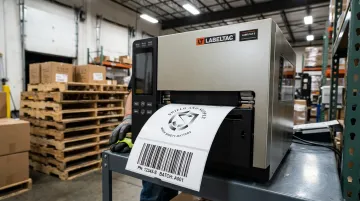
LabelTac® printers from Shield and Supply operate at 300 DPI thermal transfer resolution, which supports high-contrast barcode printing for reliable scanning. Both the LabelTac® Pro X ($1,299.99) and the LabelTac® 9 ($3,999.00) include LabelSuite™ software free — and both carry a Full Lifetime Warranty covering all parts and labor. For facilities that want software and hardware from a single accountable source, that combination removes a significant integration variable.
Integration with ERP, WMS, and Shipping Carriers
The right integration means label data flows in automatically — no manual re-entry, no transcription errors. Key capabilities to evaluate:
- Pre-built connectors to common ERP and WMS platforms (SAP, Oracle, QuickBooks, Shopify)
- REST API availability for custom integrations
- CSV/Excel import for facilities not yet on a formal ERP — this enables standalone operation while leaving room to integrate later
- Carrier compliance auto-formatting — the software should populate FedEx, UPS, USPS, and DHL label fields according to each carrier's current specifications
USPS, for instance, requires barcodes to meet ANSI grade C or above, with at least 70% of barcodes achieving grade A or B. Carrier specs change regularly. Your labeling software should stay current with those requirements automatically — not hand that verification task back to your shipping team.
Batch Printing and Automation Rules
High-volume receiving and shipping operations can't print labels one at a time. Look for:
- Batch printing triggered by PO import or order wave
- Automation rules — for example, "if carrier = UPS Ground, apply template X" — to eliminate manual template selection
- Serialization across a batch so each label in a run gets a unique identifier without manual intervention
LabelSuite™ supports variable-data serialization and CSV/Excel batch imports. For automation rule configuration specific to your workflow, Shield and Supply's support team (877-514-0727) can walk through the available options.
Barcode Label Types and Formats in Shipping & Receiving
1D Formats
| Format | Primary Use |
|---|---|
| GS1-128 / Code 128 | Shipping labels, SSCC pallet labels — the standard for logistics units |
| ITF-14 | Case/carton-level GTIN identification |
| UPC / EAN | Unit-level retail items |
| Code 39 | Internal tracking, asset labeling, simpler environments |
GS1-128 is the foundation. If your facility ships or receives pallets in any supply chain that follows GS1 standards — which includes most major retailers and distributors — your labeling software must generate compliant GS1-128 SSCC labels.
2D Formats
- QR Code — High data density, links to product documentation, SDS sheets, or digital records
- Data Matrix — Small-item labeling, electronics components (EIA standard for part marking), tight label real estate
- PDF417 — Compliance documents, bills of lading; DHL Freight added PDF417 support to its label specification in 2017
Use 2D when data volume exceeds what a 1D symbol can carry, or when label space is too small for a readable 1D barcode.
Format selection only gets you so far — material choice determines whether that barcode stays readable from dock to delivery.
Label Materials for Dock Environments
Material selection directly affects scan reliability throughout a shipment's journey. As reported by Inbound Logistics, GTL Data Matrix codes become unreadable due to polybag wrinkles, glare, hot spots, and thermal bleeding — creating sorting bottlenecks and forcing slow manual deciphering.
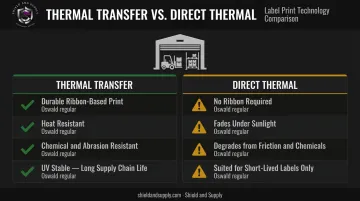
- Thermal transfer — Ribbon-based printing creates durable images resistant to heat, chemicals, abrasion, and UV exposure. Use for any label that needs to survive the full shipment journey or remain readable in a warehouse environment.
- Direct thermal — No ribbon required; suitable for short-lived shipping labels. Degrades under sunlight, friction, and chemicals — unreliable for long-term warehouse use.
For facilities running LabelTac® printers, Shield and Supply's thermal transfer vinyl rolls and resin/wax-resin ribbons are rated waterproof, chemical-resistant, and abrasion-resistant — designed specifically for labels that pass through multiple scan points before delivery.
How to Implement Barcode Labeling Software in Your Facility
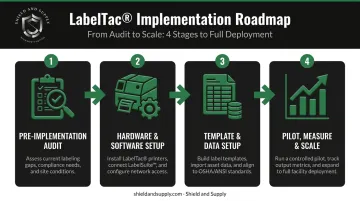
Step 1: Pre-Implementation Audit
Map every point in the workflow where a label is created, applied, or scanned. Identify:
- Which labels are manually produced today
- Which are pulled from carrier systems
- Which are missing entirely
This baseline prevents the most common mistake in labeling projects: digitizing a broken process and simply producing errors faster.
Once you know where every label lives in your workflow, you're ready to match hardware and software to those specific touchpoints.
Step 2: Hardware-Software Setup
Select printers and scanners that are compatible with your labeling software before purchasing. Confirm:
- Print languages match software output
- DPI settings align with label template designs
- Standard printer models are established per dock station to simplify support
Pairing matched hardware and software — like LabelTac® printers with LabelSuite™ — cuts integration time and keeps support straightforward. Shield and Supply manufactures both, and the free lifetime support (phone, email, live chat) means one call resolves hardware and software questions together.
Step 3: Template and Data Setup
Build label templates for each use case:
- Receiving / ASN labels
- Put-away and location labels
- Packing and carton content labels
- Carrier shipping labels
- Returns processing labels
Connect the software to your data source — ERP, WMS, or spreadsheet import — and validate that variable fields populate correctly on test labels before going live. Print test samples and scan them with actual warehouse scanners before marking a template ready for production.
With templates validated and data sources confirmed, the final step is proving the system works under real shipping conditions.
Step 4: Pilot, Measure, and Scale
Run a two-to-four week pilot on one dock door or one product line with real shipments. Track:
- Scan success rates
- Label application time per package
- Receiving and shipping error rate
Use that data to refine templates and train staff with short visual SOPs posted at each station. Then roll out to additional dock doors or facility locations with a process that's already proven.
Frequently Asked Questions
What is the difference between barcode labeling software and a warehouse management system (WMS)?
Barcode labeling software focuses on designing, generating, and printing labels. A WMS manages broader operations — inventory, putaway, picking, and order management. Labeling software often integrates with or is embedded within a WMS, but it can also run as a standalone solution.
What barcode types are most commonly used in shipping and receiving?
The most common formats by application:
- GS1-128 (Code 128) — standard for shipping labels and SSCC pallet labels
- ITF-14 — used at the case/carton level
- QR Code and Data Matrix — widely used for high-density data, compliance documentation, and small-item marking
Can barcode labeling software integrate with my existing ERP or WMS?
Most modern labeling software supports integration via pre-built connectors or REST APIs with common ERP and WMS platforms. This enables automatic label data population from purchase orders, sales orders, and inventory records — eliminating manual entry. Facilities without a formal ERP can use CSV/Excel imports as an interim source.
What label material works best for warehouse shipping and receiving environments?
Thermal transfer labels are the right choice for durability in dock and warehouse conditions — resistant to heat, moisture, abrasion, and UV exposure. Direct thermal labels work for short-lived shipping labels but degrade under friction and sunlight, making them unreliable for anything that needs to survive a full supply chain journey.
How do I know if my barcode labels meet carrier compliance requirements?
Carrier-compliant labels must follow specific format, symbology, field placement, and quiet zone rules set by each carrier. Good labeling software auto-formats to current carrier specifications. Test printed labels with actual carrier scan equipment before going live — USPS requires ANSI grade C or above, and UPS charges $5.00 per package for non-compliant Ground Saver labels.
Does barcode labeling software help with OSHA or GS1 compliance?
Yes. Labeling software can enforce standardized templates that satisfy GS1 data structure requirements and OSHA-mandated formats — including hazardous material identification labels under 29 CFR 1910.1200 and DOT package marking under 49 CFR 172.301. LabelSuite™ includes pre-built GHS HazCom templates with all nine GHS pictograms for facilities that need both shipping and safety labeling from one platform.