Key Takeaways
- Digital screens can display all OSHA-required sign types (Danger, Caution, Safety Instruction) with proper color coding per 29 CFR 1910.145, but they complement, not replace, physical signs.
- Rotating and updated content directly counteracts sign blindness, which research confirms reduces alertness to repeated warnings.
- Emergency override capability lets digital systems broadcast facility-wide alerts that static signs simply cannot deliver.
- Placement matters: screens near actual hazards satisfy OSHA's proximity requirement; a break room screen does not substitute for one at the hazard itself.
- Physical labels (pipe markers, arc flash labels, LOTO tags, GHS/HazCom labels) remain legally required and must accompany equipment and containers.
A safety sign posted on day one carries real weight. By week four, most workers have stopped seeing it. The hazard hasn't changed, but the brain has categorized the sign as background noise and moved on.
That's the core problem with a static compliance framework applied to dynamic workplaces. Machinery changes between shifts. Forklift traffic reroutes around new inventory. Procedures update after near-miss reviews. Static signs reflect none of it. That gap between what's posted and what's actually happening is where compliance risk lives.
This guide covers what OSHA actually requires for safety signage, where static signs fall short, how digital signage can meet those requirements, and what content and placement strategy makes it effective.
One important baseline: digital signage doesn't rewrite OSHA's rules. It's a tool for meeting them more reliably, and in some cases more completely than laminated paper ever could.
OSHA Signage Requirements: What the Law Actually Says
OSHA's primary signage standard for general industry is 29 CFR 1910.145 — "Specifications for Accident Prevention Signs and Tags." It applies to any sign intended to warn workers of hazards that could cause accidental injury or property damage.
The Sign Categories
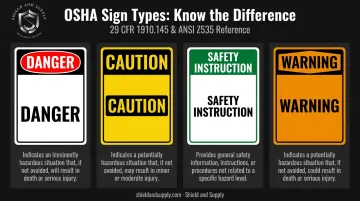
1910.145 establishes three core sign classes, with a fourth covered under ANSI Z535 (which OSHA formally recognized in its 2013 signage rulemaking). Each class carries specific color and wording requirements:
| Sign Type | Use Case | Color Scheme |
|---|---|---|
| Danger | Immediate hazard with likely death or serious injury | Red upper panel, black border, white lower panel |
| Caution | Potential hazard or unsafe practice | Yellow background, black panel with yellow letters |
| Safety Instruction | General instructions and safety measures | White background, green panel with white letters |
| Warning | Hazard level between Caution and Danger (per ANSI Z535/tags) | Orange background, black lettering |
Design Requirements
- Rounded or blunt corners; no sharp edges, burrs, or projections
- Legible text readable at 5 feet or greater
- Wording that is concise, accurate, and — per 1910.145(e)(2) — phrased positively ("Keep Clear" rather than "Don't Block")
- Color standards aligned with ANSI Z535.1, Z535.2, and Z535.5
Placement
Signs must be posted as close as safely possible to the actual hazard, in locations where all exposed workers will encounter them. OSHA's posting rules for required notices (1903.2, 1904.32) require conspicuous placement and prohibit alteration, defacement, or covering.
Tags vs. Signs: Why Digital Screens Can't Replace Physical Tags
Accident prevention tags under 1910.145(f) are temporary warning devices used until a hazard is eliminated. This includes lockout/tagout tags, confined space entry tags, and defective equipment warnings. Tags are physically attached to the hazard itself and must be understandable to all exposed employees.
Digital signage cannot replace tags in these scenarios. A screen displaying a LOTO warning does not substitute for a physical tag on the equipment.
Why Static Signs Fall Short in Dynamic Work Environments
The brain is wired to filter out unchanging stimuli. A bright yellow Caution sign gets encoded as part of the environment — furniture, essentially — after repeated exposure.
Research supports this directly. A 2009 study by Kim and Wogalter exposed 72 participants to 320 visual warnings. Alertness to repeated warnings declined from M=4.02 to M=3.81 — but when the warning format changed, alertness recovered to M=4.17. The content was identical; only the format changed. Digital signage works precisely because format variation reactivates attention that static signs have already lost.
The Operational Mismatch
Modern industrial facilities aren't static environments. Consider what changes in a typical week:
- Machinery starts or stops across different shifts
- Forklift traffic reroutes based on inventory staging
- Procedures update following near-miss reviews or audits
- Temporary hazards appear during maintenance windows
- New chemicals are introduced without corresponding sign updates
Static signs reflect a fixed moment in time. When the operation changes and the sign doesn't, you have a compliance gap — and a safety gap.
The Hidden Cost of Updates
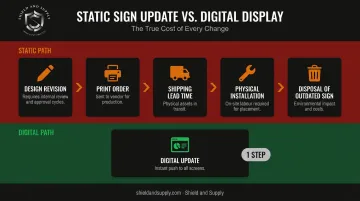
Every time a static sign needs updating, there's a real-world queue: design revision, print order, shipping lead time, physical installation, and disposal of the outdated version. Multiply that across multiple buildings and dozens of sign locations and you have a system that's nearly guaranteed to lag behind operational reality. Digital signage eliminates most of that queue — which is why compliance-focused facilities are increasingly treating it as infrastructure, not an upgrade.
How Digital Signage Meets OSHA Compliance Requirements
The core compliance principle is straightforward: a digital display showing a properly formatted Danger sign — correct color coding, legible text at required size, accurate wording — meets 29 CFR 1910.145 design requirements. The format is different; the standard it must meet is not.
That said, OSHA has not issued an interpretation letter explicitly confirming that digital screens alone satisfy all 1910.145 or poster posting requirements. Treat digital signage as a highly effective compliance layer, not a wholesale replacement for required physical signage.
Where digital signage earns its place is in what it can do that static signs simply cannot. Here's where the difference is most pronounced:
What Digital Does Better
Real-time content updates. When a procedure changes or a new chemical is introduced, a central dashboard pushes updated content to every screen in the facility at once — no printing, no shipping, no installation delay. The compliance lag that plagues static sign programs disappears.
Emergency override. During a spill, equipment failure, or evacuation, all screens can broadcast immediate, situation-specific instructions simultaneously. Static signs are locked to whatever scenario they were printed for — they can't adapt.
Rotating and scheduled content. Screens can display:
- Shift-specific hazard warnings tied to machinery in use
- Zone-specific PPE requirements as workers move through the facility
- Rotating safety topics — proper lifting one week, chemical handling the next — keeping content fresh and fighting habituation
Compliance documentation. Digital systems log what content was displayed, when, and on which screens. During an OSHA inspection, that's verifiable proof of consistent posting — a record no static sign program can produce.
What Safety Content to Display on Digital Signs
Required OSHA Postings
Certain postings carry legal deadlines and display requirements:
- OSHA "It's the Law" poster — required in each establishment under 1903.2, conspicuously posted and not covered or defaced
- OSHA 300A Annual Summary — posted February 1 through April 30 per 1904.32
- State labor law postings — requirements vary by jurisdiction; 22 OSHA-approved State Plans cover private sector workers
- Emergency Action Plan — written EAP must be available for employee review per 1910.38
Digital signage handles these cleanly. When a regulation updates, one content change pushes to all screens. Confirm with your compliance team whether digital display alone satisfies your state's posting requirements for each item.
Hazard-Specific Content by Zone
| Zone | Content to Display |
|---|---|
| Machine areas | Machine-specific procedures, LOTO status, required PPE |
| Chemical storage | SDS quick-reference, handling procedures, spill response |
| Loading docks | Forklift/pedestrian zone boundaries, vehicle inspection checklists |
| Entry points | Daily safety focus, days-without-incident counter |
Emergency Alert Content
Beyond zone-specific content, your system needs a separate layer for emergencies. Configure overrides for:
- Fire and evacuation notices with rally point maps
- Chemical spill alerts identifying affected zones
- Severe weather warnings
- Equipment failure notifications
These should override all screens simultaneously and revert automatically when the emergency clears.
Multi-Language Support
OSHA's 2010 training policy requires that safety information be delivered in a language and vocabulary employees understand. Digital screens can rotate the same message in multiple languages on a single display — practical coverage for facilities where workers speak different languages.
Where to Place Digital Safety Screens
Screen placement is what separates active compliance tools from expensive wallpaper. Put the right content in the right location, and workers engage with it naturally — without any extra prompting required.
Highest-Impact Zones
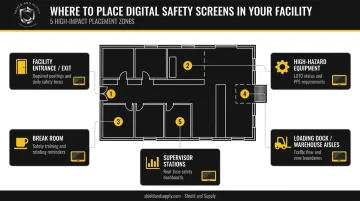
- Facility entrances and exits — First and last thing workers see. Ideal for days-without-incident counters, daily safety focus, and required postings.
- Near high-hazard equipment — Machine-specific procedures, LOTO status, and zone PPE requirements. OSHA's proximity requirement applies to digital screens just as it does to physical signs — a screen in the break room doesn't substitute for one near the actual hazard.
- Break rooms — Captive audience during downtime. Best for safety training clips, rotating reminders, and near-miss reporting culture.
- Loading docks and warehouse aisles — Forklift/pedestrian zone boundaries, vehicle inspection checklists, traffic flow updates.
- Supervisor stations — Real-time safety dashboards showing incident metrics, open corrective actions, and shift-specific hazard alerts.
Hardware Considerations for Industrial Environments
OSHA doesn't specify hardware minimums for digital displays, but environment should drive procurement decisions:
- Brightness matters on the floor — Commercial-grade displays for shop floors typically need 400+ nits; outdoor or high-ambient-light areas require 2,000–4,000 nits to remain readable.
- Enclosures protect the investment — IP65-rated units handle dust and moisture in harsh environments. Use IEC 60529 ratings to match enclosure protection level to your specific conditions.
- Connectivity requires pre-installation planning — Dead zones in large facilities take screens offline and create compliance gaps. Map network coverage before committing to mounting locations.
Digital Signage Works Best Alongside Physical Labeling
This is worth stating clearly: digital screens cannot replace all physical safety requirements.
OSHA mandates that certain warnings exist physically at or on the hazard itself. No screen across the room satisfies:
- Permanent pipe markers and equipment labels
- GHS/HazCom chemical container labels (required under 1910.1200)
- Arc flash labels on electrical equipment
- Lockout/tagout tags physically attached to isolated energy sources
- Floor markings defining pedestrian/vehicle zones
- Equipment-specific warning placards
These must be present regardless of what any screen displays. A powered-down display, a network outage, or a poorly positioned screen eliminates the safety communication entirely. A physical label on the pipe is always there.
How the Two Layers Work Together
Digital signage and physical labeling serve different functions:
- Digital: Dynamic, facility-wide communication — updated procedures, emergency alerts, rotating reminders, required postings
- Physical: Permanent, point-of-hazard identification — always present, always readable, independent of power and network
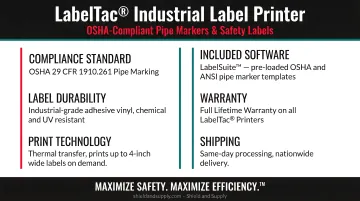
When a digital system updates a procedure, the corresponding physical label needs to change too. That's where on-demand print capability matters. Shield and Supply's LabelTac® industrial printers let facilities print custom OSHA-compliant pipe markers, arc flash labels, GHS/HazCom labels, LOTO labels, and safety signs in-house, on demand:
- LabelTac® Pro X (starting at $1,299.99) — labels up to 4" wide
- LabelTac® 9 ($3,999.00) — large-format signs up to 9" wide
The included LabelSuite™ software supports OSHA header labels, GHS label formats, and pipe marking applications. When the digital sign updates, the physical label can follow within minutes rather than waiting on a print order.
For floor-level safety marking, Shield and Supply's SafetyTac® floor tape line handles aisle marking, hazard boundaries, and pedestrian/vehicle zone delineation — engineered to withstand forklift traffic, cleaning solutions, and heavy industrial use.
Both layers together — a digital network for dynamic communication and durable physical labels at every hazard — give facilities the complete compliance picture that neither approach delivers alone.
Frequently Asked Questions
What are the OSHA requirements for signage?
OSHA's signage standard is 29 CFR 1910.145, covering accident prevention signs for general industry. It requires signs to use specific color coding by hazard level (Danger, Caution, Safety Instruction), be legible at 5 feet or more, have no sharp edges, and use positive wording. Signs must be posted close to the actual hazard where exposed workers will encounter them.
What is the difference between signage and digital signage?
Traditional signage is static printed material — fixed content, fixed location. Digital signage uses screens to display dynamic, updatable content. Both can meet OSHA's design requirements for color coding and legibility, but digital adds real-time updates, emergency override capability, and content rotation that static signs cannot offer.
How does signage improve safety?
Signage communicates hazard presence, required precautions, and emergency procedures before workers reach a danger zone — so the correct response is known before an incident can occur.
What are the benefits of digital signage for safety?
Key advantages include real-time content updates across all locations from a single dashboard, emergency override alerts that reach every screen simultaneously, rotating messages that counteract habituation, multi-language display for diverse workforces, and automatic documentation of what was posted and when — useful during OSHA inspections.
What are the ADA requirements for digital signage?
ADA requirements apply primarily to signs identifying permanent rooms and spaces, covering contrast ratios, character height, tactile raised characters, and Grade 2 Braille. A digital screen used for permanent room identification doesn't eliminate the need for a compliant tactile/Braille sign alongside it.
What is the ISO standard for signage?
ISO 7010:2019 covers registered safety signs for accident prevention, fire protection, and emergency evacuation using internationally standardized symbols. ISO 3864 addresses graphical symbols and safety colors — both complement OSHA's ANSI-based requirements and are most applicable to multinational facilities needing consistent signage across jurisdictions.