Introduction
A QR code label is only as reliable as the printer that produced it. In warehouse and manufacturing environments — where a single unreadable label can stall an inventory cycle count or trigger a compliance audit — the printer behind the label is a business-critical piece of equipment.
The industrial asset tracking market reached $24.14 billion in 2024 and is projected to hit $51.59 billion by 2030, according to Grand View Research. That growth runs directly through QR-coded labels on equipment, shelving, pallets, and containers.
The GS1 Sunrise 2027 initiative is accelerating that shift further — pushing retailers and supply chains to move from 1D UPC barcodes to 2D formats like QR codes across the board.
The wrong printer choice creates measurable problems: QR codes that fail to scan due to low resolution, labels that peel off chemical-exposure surfaces within weeks, or print speeds that bottleneck a high-volume line.
This guide breaks down the specs that matter, the tradeoffs between printer types, and the options worth considering for industrial use.
TL;DR
- Two print technologies: Direct thermal skips the ribbon (lower cost, shorter lifespan); thermal transfer uses a ribbon for labels that resist chemicals, heat, and abrasion
- Minimum 300 DPI for reliable QR scanning — asset tags under 1 inch typically need 600 DPI
- Key buying factors: Resolution, label media compatibility (vinyl, polyester), connectivity, print volume, and total cost of ownership
- Top picks by tier: LabelTac® 9, Zebra ZT411, Brady BBP33, Zebra ZD421, DYMO LabelWriter 550
- Purpose-built label design software cuts setup time and reduces errors across any printer
What Is a QR Code Label Printer and Why Industrial Operations Need One
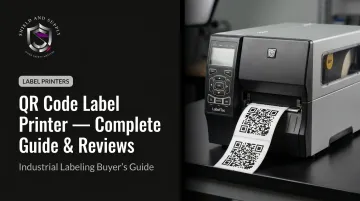
A QR code label printer is a dedicated output device, typically direct thermal or thermal transfer, that produces machine-readable 2D matrix codes on adhesive labels for physical attachment to products, equipment, shelving, or packaging.
In consumer settings, any 300 DPI printer will do. Industrial environments demand more — labels here face grease, heat, impact, and compliance scrutiny that office-grade hardware simply isn't built for.
Why the stakes are higher in warehouses and plants:
- Inventory tracking fails when QR labels degrade after repeated scan cycles — illegible codes mean manual lookups and lost time
- Asset management on equipment requires labels that survive grease, high heat, and physical contact without peeling or fading
- OSHA hazard communication labels must stay readable and intact; a faded label is a compliance violation, not just an inconvenience
- Maintenance workflows tied to QR-linked work orders break down entirely if the label fails before the next service interval
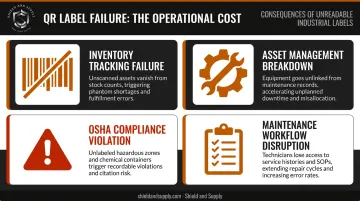
Label failure in these contexts isn't an annoyance — it's downtime, a compliance gap, or a direct safety hazard. Getting the printer technology, resolution, and media right from the start is what prevents that failure.
Top QR Code Label Printers for Industrial and Warehouse Use
Each printer below was evaluated on print resolution, label media compatibility, hardware durability, connectivity, print volume capacity, and total cost of ownership.
LabelTac® 9 (Shield and Supply)
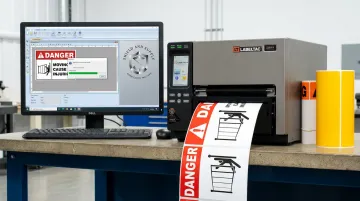
The LabelTac® 9 is Shield and Supply's purpose-built large-format industrial label printer, engineered specifically for manufacturing plants, warehouses, and facilities requiring OSHA-compliant safety and identification labels. It's one of the few industrial printers in its class to carry a Full Lifetime Warranty covering all parts, labor, and related costs — at no additional charge.
The format range is where the LabelTac® 9 earns its place in larger facilities. Supporting label widths from 4" to 9", a single unit covers equipment asset tags, full-scale OSHA Danger/Warning signs, pipe marking labels for large-diameter piping, and arc flash hazard labels.
It also ships with LabelSuite™ Design and Print Software (a $299.99 value) at no extra cost. LabelSuite™ supports QR code generation, variable data printing from CSV/Excel files, and batch production of unique sequential QR codes — so asset tracking and equipment ID workflows are operational from day one.
| Spec | LabelTac® 9 |
|---|---|
| Print Technology | Thermal transfer |
| Print Resolution | 300 DPI |
| Print Width | 4" to 9" |
| Daily Volume Capacity | Up to 2,500 labels/day |
| Connectivity | USB 2.0, built-in Ethernet |
| Label Media | Vinyl, magnetic, reflective, glow-in-the-dark, high-temp, chemical-resistant, metallic, dry erase, repositionable |
| Software | LabelSuite™ included free ($299.99 value) |
| Warranty | Full Lifetime Warranty (parts, labor, related costs) |
| Price | $3,999.00 USD |
Zebra ZT411
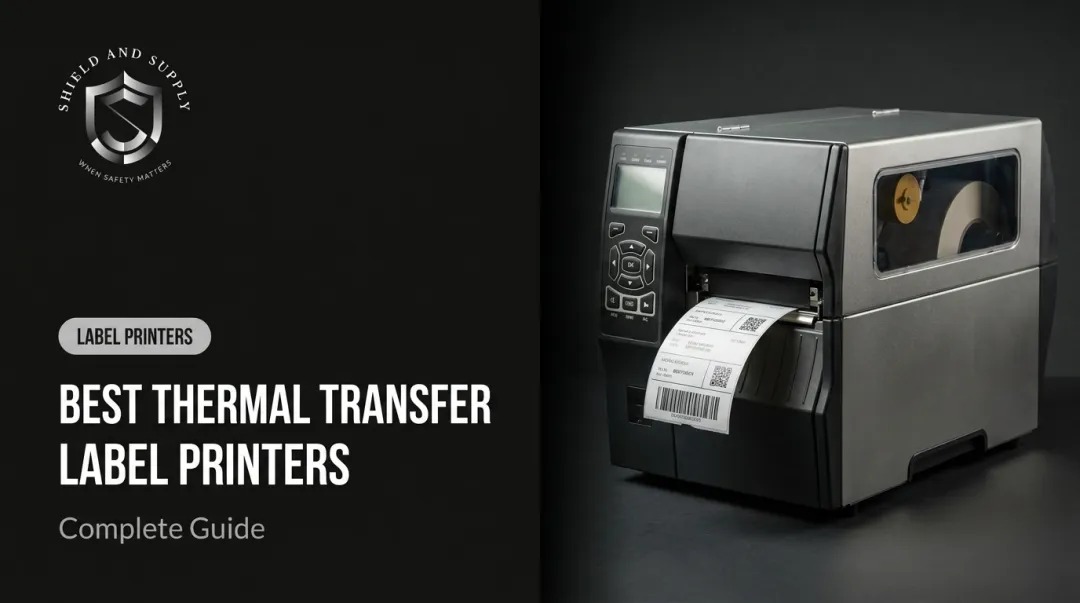
The Zebra ZT411 is the standard-bearer for high-volume industrial label printing. Built for 24/7 warehouse and manufacturing operation, its all-metal construction handles continuous print runs that would degrade a desktop unit within months.
Three available resolution options — 203, 300, or 600 DPI — make it one of the few industrial printers capable of producing small-format QR codes at the density required for reliable scanning after wear.
| Spec | Zebra ZT411 |
|---|---|
| Print Resolution | 203 / 300 / 600 DPI |
| Print Speed | Up to 14 inches per second |
| Max Print Width | 4.09" |
| Connectivity | USB 2.0, RS-232, Ethernet, Bluetooth 4.1; optional Wi-Fi |
| Label Media Width | 1.0" to 4.5" |
| Price Range | ~$2,119 USD (varies by configuration) |
Brady BBP33
The Brady BBP33 is a thermal transfer printer purpose-designed for facility safety environments — manufacturing floors, chemical plants, and electrical maintenance areas where label substrate matters as much as print quality. Brady's proprietary media ecosystem spans more than 16 material types, including vinyl, polyester, foil, and ultra-destructible substrates.
Brady has retired the BBP33. The printer remains available through resellers, but confirm supply availability before purchasing.
| Spec | Brady BBP33 |
|---|---|
| Print Resolution | 300 DPI |
| Print Speed | Up to 4 inches per second |
| Max Label Width | 4" |
| Label Media Options | 16+ Brady-specific substrates (vinyl, polyester, foil, ultra-destructible) |
| Connectivity | USB, Ethernet |
| Price Range | ~$3,597 USD (reseller pricing; no longer at MSRP) |
Zebra ZD421
The Zebra ZD421 is a compact desktop-class printer suited for workstation-level QR code label printing in distribution centers, receiving docks, or quality control areas. Its dual-mode capability — supporting both direct thermal and thermal transfer configurations — gives operations flexibility to choose the right method per application.
The field-replaceable printhead and platen roller design is a practical advantage: maintenance doesn't require sending the unit out for service.
| Spec | Zebra ZD421 |
|---|---|
| Print Resolution | 203 or 300 DPI |
| Print Speed | 4 or 6 inches per second |
| Connectivity | USB, Ethernet, Serial, Bluetooth LE; optional Wi-Fi 6/Bluetooth 5.3 |
| Print Technology | Direct thermal or thermal transfer (by configuration) |
| Price Range | ~$510–$798 USD depending on configuration |
DYMO LabelWriter 550
The DYMO LabelWriter 550 is a direct thermal desktop printer intended for light commercial or administrative applications — think QR code labels for file folders, shipping documentation, or low-volume equipment tagging where durability isn't the primary concern.
Its automatic label recognition feature detects label type and adjusts settings automatically, making it accessible for non-technical staff. At $147 USD, it's the most affordable option here, but its USB-only connectivity and direct thermal-only output disqualify it from any application involving chemicals, heat, or outdoor exposure.
| Spec | DYMO LabelWriter 550 |
|---|---|
| Print Resolution | 300 DPI |
| Print Speed | 62 labels/minute |
| Print Technology | Direct thermal only |
| Connectivity | USB only |
| Price | ~$147 USD |
Key Features to Look for in a QR Code Label Printer
Print Resolution
300 DPI is the floor, not the target. At 300 DPI, a standard QR code on a 2"+ label will scan reliably. But for asset tags under 1 inch (common in electronics manufacturing, tool cribs, and server rack labeling) 600 DPI is necessary to maintain sufficient module density.
Low resolution is the most common and most overlooked cause of QR scan failures. A code that looks fine to the human eye can have insufficient dot density to decode under a scanner, especially after the label has experienced any wear.
Label Media Compatibility
Industrial applications demand synthetic substrates:
- Vinyl — outdoor durability, UV and abrasion resistance
- Polyester — chemical and solvent resistance, high-temperature ratings
- Polypropylene — moisture resistance, flexible surface adhesion
Paper labels will not survive a manufacturing floor. For equipment labels that must comply with ANSI/UL 969 marking and labeling standards, the substrate selection is as important as the print quality.
Print Speed and Volume
A printer rated for under 1,000 labels/day is not interchangeable with an industrial unit built for continuous 24/7 operation. Exceeding a printer's rated duty cycle accelerates printhead degradation — the most expensive maintenance event for any thermal printer.
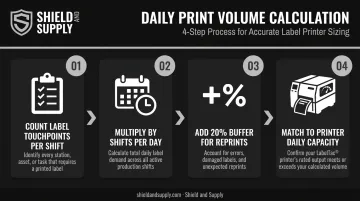
Before purchasing, calculate your actual daily volume:
- Count label touchpoints per shift (receiving, putaway, shipping, equipment tags)
- Multiply by shifts per day
- Add a 20% buffer for reprints and errors
- Match that number to the printer's rated daily capacity
Connectivity and System Integration
| Use Case | Recommended Connection |
|---|---|
| Single dedicated workstation | USB |
| Shared across workstations | Ethernet |
| Mobile or wireless printing | Wi-Fi or Bluetooth |
| Network-integrated WMS/ERP printing | Ethernet (primary) |
Verify WMS or ERP compatibility before purchase. Most industrial printers support standard print protocols (ZPL, EPL), but confirming driver compatibility with your specific system avoids integration problems after deployment.
Total Cost of Ownership
The purchase price is typically the smallest line item over a 5-year ownership period. Factor in:
- Ribbon and label media, billed continuously as you consume supplies
- Printhead replacements, which wear faster with abrasive media or high duty cycles
- Software licensing fees — LabelTac® printers include LabelSuite™ at no added cost
- Warranty terms: a Full Lifetime Warranty eliminates unpredictable repair costs entirely
A $1,500 printer that requires two printhead replacements and lacks warranty coverage can easily cost more over four years than a $4,000 printer with lifetime coverage.
How We Chose the Best QR Code Label Printers
The printers in this guide were assessed against real operational demands of industrial facilities — not office or small-business scenarios — with the evaluation prioritizing:
- Print resolution performance on synthetic substrates
- Hardware build quality and rated duty cycle
- Connectivity for industrial network environments
- Software ecosystem including label design tools and variable data support
- Warranty terms and US availability of replacement supplies
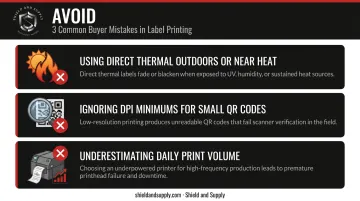
Three buyer mistakes to avoid:
Don't use direct thermal in outdoor or high-heat environments. Heat-sensitive paper darkens or fades under exactly those conditions — labels near ovens or loading docks will fail quickly.
Don't ignore DPI minimums for small QR codes. A 203 DPI printer cannot reliably produce a scannable code on a 0.75" asset tag. Verify your target label size against the printer's resolution before ordering.
Don't underestimate daily volume. Buyers frequently choose desktop-class printers for applications that need industrial capacity. A unit rated for 500 labels/day running at 1,500 labels/day will experience accelerated wear and unplanned downtime.
Conclusion
The right QR code label printer for an industrial facility comes down to matching three things: resolution to your smallest label, media compatibility to your environment, and duty cycle to your actual daily volume. Defaulting to the cheapest or most familiar brand without verifying those specs is where most purchasing mistakes happen.
For warehouses and manufacturing plants where label failure means inventory errors, compliance gaps, or safety incidents, a purpose-built industrial printer with lifetime warranty coverage is a long-term operational investment — not a commodity.
Shield and Supply's LabelTac® 9 is built around those same criteria — thermal transfer printing for resolution, broad vinyl and specialty media support for harsh environments, and included LabelSuite™ software to get facilities running without a separate software purchase. It's backed by a Full Lifetime Warranty. To get help matching the right printer and media to your operation, contact the Shield and Supply team at 877-514-0727 or info@shieldandsupply.com.
Frequently Asked Questions
What label maker can print QR codes?
Most thermal label printers — including desktop models from Brother, Zebra, and DYMO, as well as industrial printers like the LabelTac® — can print QR codes, provided the printer offers at least 300 DPI resolution. The printer also needs to be paired with label design software that supports QR code generation, such as LabelSuite™.
What is the minimum QR code size for a scannable label?
QR code sizing depends on data density, scanning distance, and printer resolution — there is no single universal minimum. ISO/IEC 18004 defines module dimensions by use case, and larger codes are required as scanning distance increases. Always verify scannability on your actual label stock and scanner before a full production run.
What is the difference between direct thermal and thermal transfer for QR code labels?
Direct thermal uses heat-sensitive paper that darkens without ink, making it lower cost but prone to fading under heat, UV, or chemical exposure. Thermal transfer uses a ribbon to bond ink onto synthetic substrates, producing labels that resist chemicals, moisture, and abrasion. For industrial QR code applications, thermal transfer is the right choice.
What DPI do I need for industrial QR code labels?
300 DPI is the accepted minimum for standard QR codes on labels 1" and larger. For small-format asset tags or dense-data labels, 600 DPI is recommended to keep QR modules sharp enough for reliable scanning after wear and handling.
Can QR code labels be printed on vinyl or polyester for outdoor or industrial use?
Yes. Thermal transfer printers paired with vinyl or polyester label stock produce durable QR code labels rated for outdoor and industrial conditions. The ribbon type must match the substrate (wax, wax-resin, or resin) to achieve the intended chemical and abrasion resistance. Confirm ribbon-media pairing with your supplier before production.
How do I design and print QR code labels in bulk for asset tracking?
Bulk QR code printing requires label design software that supports variable data printing, which generates unique codes from a spreadsheet or database and prints them in sequence. LabelSuite™ supports CSV and Excel import for this workflow, enabling batch production of unique QR code labels directly through LabelTac® printers.