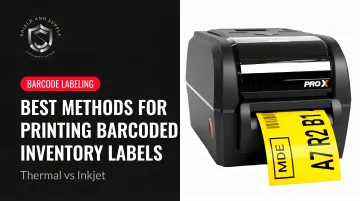
Thermal and inkjet printers both produce labels. But their performance in industrial environments diverges sharply across durability, scan reliability, daily volume, and long-term cost. Choosing the wrong one means reprinting labels, investigating scan failures, and eating the operational costs that follow.
This article breaks down how each technology works, compares them head-to-head, and gives you a clear framework for choosing the right method for your operation.
Key Takeaways
- Thermal printing (direct thermal and thermal transfer) is the industrial standard for barcoded inventory labels
- Direct thermal suits short-lifecycle labels — shipping, receiving, and cross-docking — with a lifespan of up to 6 months
- Thermal transfer handles long-term labels exposed to heat, chemicals, or abrasion; some ribbon-and-label combinations hold up for 10+ years outdoors
- Inkjet works for color branding and low-volume office use, but underperforms in industrial settings
- The right choice hinges on label lifespan, environmental exposure, daily volume, and total cost of ownership
Thermal vs. Inkjet for Barcoded Inventory Labels: Quick Comparison
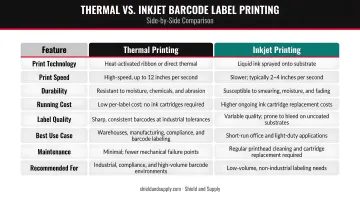
Here's how thermal and inkjet stack up across the factors that matter most for barcoded inventory labels — speed, durability, cost, and scan reliability.
| Attribute | Thermal | Inkjet |
|---|---|---|
| Print method | Heat-based printhead (direct on media or through ribbon) | Sprays liquid ink droplets from a cartridge |
| Speed | Up to 14 ips (Zebra ZT411 at 203 dpi) | Up to 5.8 ips (Epson CW-C6000) |
| Label durability | Thermal transfer: resists water, chemicals, and UV for years | Prone to smearing/fading with moisture exposure |
| Barcode reliability | Excellent contrast; meets industrial scan standards | Acceptable in clean, controlled environments only |
| Equipment cost | Moderate upfront | Lower upfront |
| Ongoing cost | Low cost per label; minimal waste | Higher ink/cartridge costs at volume |
| Best use case | Warehouses, manufacturing, cold storage, asset tagging | Office labeling, color branding, low-volume use |
What Is Thermal Printing for Inventory Labels?
Thermal printing uses a heated printhead to create images — no liquid ink, no toner cartridges. That simplicity is exactly why it dominates industrial labeling: fewer moving parts means less maintenance, faster throughput, and more consistent output at scale.
Direct Thermal vs. Thermal Transfer
These are two distinct technologies, not interchangeable options:
Direct Thermal applies heat directly to chemically treated, heat-sensitive media. No ribbon required. According to Zebra's label guidance, direct thermal labels are typically suited for shorter indoor lifecycles — around 6 months — because the coating degrades under light, heat, and physical abrasion. Best for: shipping labels, inbound receiving, cross-docking, and fresh goods tracking.
Thermal Transfer melts ink from a ribbon onto the label substrate (paper or synthetic). The result is a permanent, bonded image. Zebra confirms that selected thermal transfer label and ribbon combinations can maintain readability for up to 10 years outdoors. Common applications: rack labels, asset tags, WIP tracking, hazardous material labels, and any label that needs to outlast the environment it's in.
Ribbon Types and When to Use Each
Matching the ribbon to the environment is critical. SATO notes that using the wrong ribbon produces poor print quality, smearing, and forced speed reductions — all of which create label failures downstream.
| Ribbon Type | Best For |
|---|---|
| Wax | Standard coated paper; short-term shipping and compliance labels in normal conditions |
| Wax-Resin | Semi-rugged environments; bin labels, horticulture tags on coated paper or synthetics |
| Resin | Harsh environments; chemical drums, circuit boards, outdoor storage on polyester or polyimide |
Why Thermal Works at Industrial Scale
- Fast throughput: Industrial platforms like the Zebra ZT411 and SATO CL4NX Plus run at up to 14 ips — critical for high-volume label runs
- On-demand variable data: Serial numbers, batch codes, SKUs, and location IDs print without reformatting
- Minimal maintenance: No cartridges to replace, no ink levels to monitor mid-shift
- Barcode market dominance: Barcode printing accounts for nearly 40% of thermal printing revenue, reflecting how thoroughly this technology has embedded itself in logistics and manufacturing
Where Thermal Fits in Warehouse and Manufacturing Workflows
- Permanent rack and bin labels
- WIP (work-in-progress) tracking tags
- Fixed asset identification
- Cold storage labels
- Hazardous material and GHS labels
- Outbound shipping labels
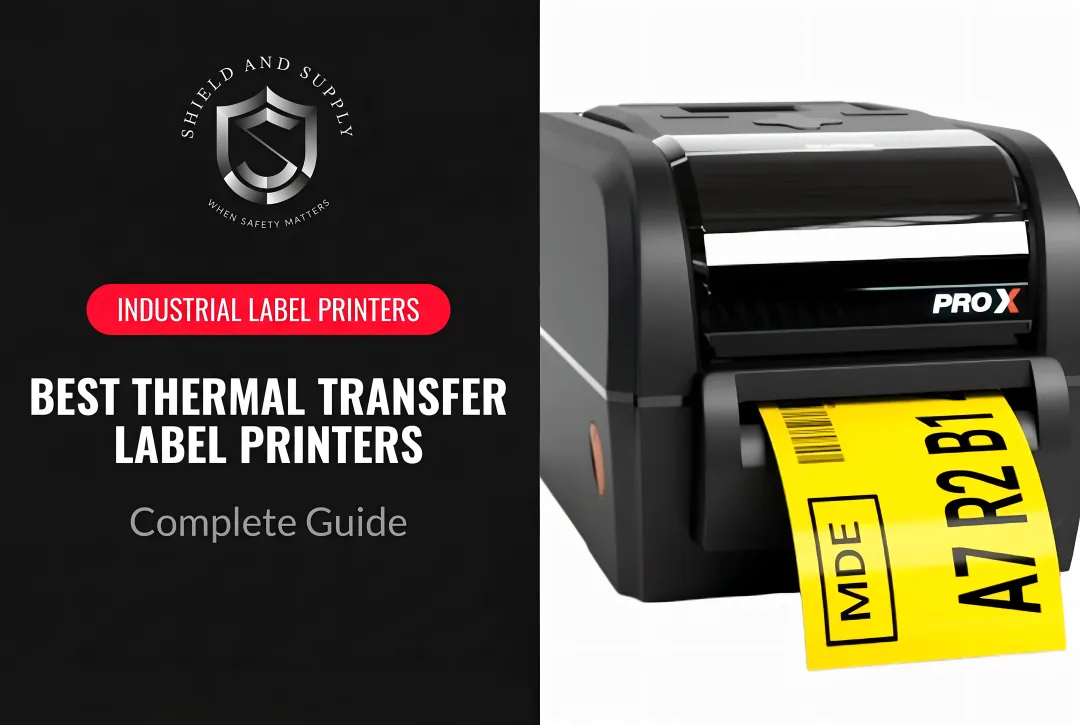
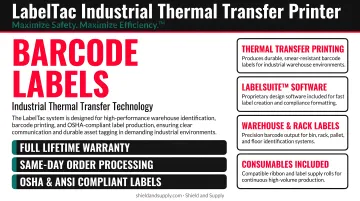
Shield and Supply's LabelTac® industrial label printers are purpose-built for exactly these applications. Both the LabelTac® Pro X ($1,299.99) and the LabelTac® 9 ($3,999.00) use thermal transfer technology with multi-color ribbon options that deliver scratch- and chemical-resistant output.
The LabelTac® 9 handles up to 2,500 labels per day — a realistic volume for mid-to-large facilities — and both models include a Full Lifetime Warranty on all parts and labor. In environments where printer downtime directly cuts into throughput, that coverage isn't a perk; it's a practical requirement.
What Is Inkjet Printing for Inventory Labels?
Inkjet printers work by spraying liquid ink droplets from a cartridge onto the label surface. Lower upfront hardware cost and full-color output make inkjet attractive for small businesses, office environments, and brand-heavy label applications — but those advantages don't hold up well in industrial barcoding.
Core Limitations in Industrial Settings
- Water-based inks smear or run when exposed to humidity, condensation, or spills — a routine condition in warehouses and cold storage
- Dot placement variability reduces scan consistency, particularly in fast-paced environments where labels are read at distance or at angles
- Clogging and ink depletion require regular monitoring, adding maintenance overhead thermal printing avoids
- High ink coverage demands for solid black barcodes — versus text-only documents — increase cost per label significantly at volume
Some industrial inkjet solutions address specific niches. Epson's ColorWorks line uses pigment-based DURABrite inks that are water- and chemical-resistant, and select configurations are BS 5609-certified for chemical labeling. That works for GHS or color-coded compliance labels. It's not a fit for general-purpose warehouse barcoding.
Where Inkjet Actually Makes Sense
- Product packaging labels requiring full-color graphics
- Retail shelf labeling in temperature-controlled, clean environments
- Color-coding systems for office inventory
- Supplemental information labels printed alongside thermally printed primary barcodes
- Operations printing fewer than ~50 labels per day with no industrial exposure
Thermal vs. Inkjet: Which Method Is Right for Your Operation?
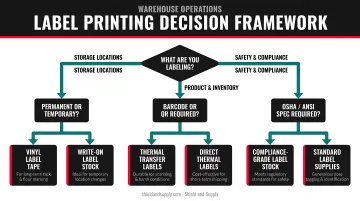
Four variables determine the right choice: label lifespan, environmental exposure, daily print volume, and total cost of ownership.
Decision Framework
Choose Thermal Transfer if:
- Labels must survive 6+ months in service
- The environment involves humidity, temperature swings, chemicals, UV, or forklift contact
- Labels are used for compliance, safety, or asset tracking where scan failure has real consequences
- Daily volume exceeds 50 labels or variable data changes frequently
Choose Direct Thermal if:
- Labels are short-lifecycle — under 6 months
- Use cases include shipping, receiving, cross-docking, or fresh goods tracking
- Speed and simplicity matter more than durability
Consider Inkjet only if:
- Print volume is very low
- Color branding or visual differentiation is the primary requirement
- No industrial exposure exists
- You already own the equipment
The Total Cost of Ownership Reality
Inkjet looks cheaper on paper. A desktop inkjet printer costs less than a dedicated industrial thermal unit. That gap closes fast at any meaningful volume.
Consider what bad barcodes actually cost. GS1 US research reports that organizations relying primarily on 1D barcodes face a 7% first-pass scan failure rate and 1.5% relabeling rate — translating to modeled annual costs of $87,800 in rescan labor, $31,900 in relabeling, and $696,000 in shipment errors. Label failures are expensive, and inkjet's higher failure rate in industrial conditions multiplies every one of those costs.
Thermal's advantages compound over time:
- No ink cartridge replacements or clogging incidents
- Lower media cost per label at volume
- Reduced reprint labor from label failures
- No sheet waste from partial-roll printing
Label Design Software Matters Too
Regardless of print method, label consistency depends on software. Shield and Supply's LabelSuite™ comes free with every LabelTac® printer ($299.99 standalone value) and is purpose-built for industrial workflows — covering rack labeling, OSHA compliance, pipe marking, 5S labeling, and barcoding.
For facilities managing variable data across SKUs, locations, and batch codes, having software and printer matched from the start removes a common source of label errors.
Real-World Application: Why Facilities Make the Switch
Consider a distribution center running standard inkjet-printed barcode labels on shipping and receiving. In dry conditions, the labels scan fine. But in summer, when dock doors stay open and humidity spikes, labels start smearing at the edges. Scan rates drop. Receivers start manually keying in data. A shift that typically processes 400 inbound pallets takes an extra 45 minutes.
The pain point isn't dramatic — it's cumulative. Each reprint, each manual entry, each misrouted pallet adds up. When the facility finally audits the problem, they find the inkjet labels failing at roughly three times the rate of the thermally printed labels used elsewhere in the same facility.
Switching receiving and cross-dock labeling to direct thermal — and rack labels to thermal transfer — closes that gap. Print speeds hold through high-volume receiving windows, labels stay scannable through temperature changes, and the reprint cycle drops significantly.
That persistent drag on throughput — invisible until measured — is what drives most facilities toward dedicated thermal printing.
If your facility is in a similar position, Shield and Supply's team can help identify the right printer and media combination for your environment:
- LabelTac® Pro X — handles smaller-format inventory and compliance labels at high daily volumes
- LabelTac® 9 — supports large-format rack and signage printing where size and output matter
Both ship same day, include LabelSuite™, and carry a Full Lifetime Warranty — so equipment downtime stays off the table.
Conclusion
Thermal printing — particularly thermal transfer — is the clear choice for industrial barcoded inventory labels. The combination of durability, scan reliability, and low maintenance at scale makes it the only practical option for warehouses, manufacturing plants, cold storage, and facilities with chemical or abrasion exposure.
Inkjet has a role: color branding, low-volume office use, and specific chemical-label applications with compatible certified media. Think of it as a niche tool, not a replacement.
Thermal wins on the outcomes that matter most in industrial environments:
- Consistent scan accuracy across harsh conditions
- Fewer reprints and label failures over time
- Longer label lifespan without lamination or coatings
- Uninterrupted inventory accuracy at scale
Match your label's required lifespan and environment to the technology, then choose media and ribbon accordingly. That single decision eliminates most barcode printing problems before they start.
Frequently Asked Questions
What is the best practice for inventory labeling?
Use a dedicated thermal label printer, select media matched to your environment (synthetic for industrial, paper for clean/dry), and standardize formats across SKUs. Integrating label printing with your inventory or ERP system keeps variable data — lot numbers, locations, serial numbers — accurate without manual entry.
Can inkjet printers print scannable barcodes?
Yes, in low-volume, clean, and dry environments. In industrial settings, however, inkjet barcodes are unreliable — water-based inks smear under humidity, and dot placement variation reduces first-pass scan rates. For any facility with moisture, chemicals, or high daily scan volume, inkjet is not a dependable primary barcoding method.
How long do thermal barcode labels last?
Direct thermal labels last around 6 months indoors and degrade under heat, UV, and abrasion. Thermal transfer labels last far longer — selected synthetic media and ribbon combinations can maintain readability for up to 10 years outdoors, depending on ribbon type and substrate.
What label material should I use for industrial inventory labels?
Polyester or polypropylene synthetic materials paired with resin or wax-resin ribbons are the industrial standard — they resist moisture, chemicals, and abrasion that would destroy paper labels. For extreme temperatures or outdoor exposure, polyester or polyimide with resin ribbons is the right choice.
What type of barcode is best for warehouse inventory?
Code 128 (and its GS1-128 subset) is the warehouse standard for alphanumeric data, carrying up to 48 characters including batch, serial, and expiration data. When more data needs to fit in less space, Data Matrix or QR Code are solid 2D alternatives compatible with modern handheld and fixed-mount scanners.
Does QuickBooks have a barcode inventory system?
QuickBooks Desktop Enterprise with Advanced Inventory supports barcode scanning and bin tracking. QuickBooks Online does not include native barcode generation and requires third-party apps for scanner functionality. Most facilities pair QuickBooks with dedicated labeling software and a thermal printer — like LabelSuite™ with a LabelTac® printer — for reliable barcoded label production.